معرفی PgCLI – یک ابزار سبک و کاربردی برای اتصال و کار با پستگرس 🎥
📋 معرفی PGCLI
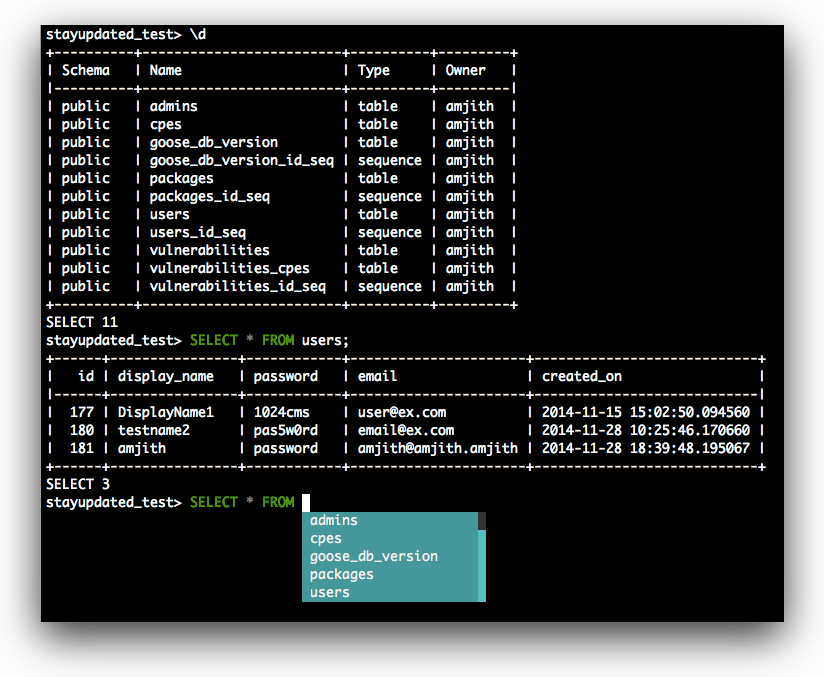
PGCLI یک رابط خط فرمان کاربرپسند و مدرن برای PostgreSQL است که تجربه سنتی psql را به طور قابل توجهی بهبود میبخشد. ساخته شده با prompt_toolkit، pgcli ویژگیهای زیر را ارائه میدهد:
- تکمیل خودکار برای کلمات کلیدی SQL و همچنین جداول و ستونهای پایگاه داده
- هایلایت کلمات کلیدی با کدگذاری رنگی عناصر SQL
- پیشنهادات هوشمند آگاه از زمینه در حین تایپ
- خروجی جدول زیبا با قالببندی بهتر
- ویرایش پرس و جو چندخطی با تورفتگی مناسب
- تاریخچه دستورات با قابلیت جستجو
- پیامهای خطای بهتر و زمان اجرای پرس و جو
PGCLI به ویژه برای موارد زیر ارزشمند است:
- توسعه تعاملی و کاوش
- تحلیل داده و اشکالزدایی
- یادگیری SQL با پیشنهادات مفید
- کار DBA продуктив با قابلیت استفاده بهتر
در حالی که psql همچنان کلاینت رسمی PostgreSQL با برابری کامل ویژگی است، pgcli در استفاده تعاملی و تجربه توسعهدهنده برتر است.
🚀 راهنمای نصب
Ubuntu/Debian (سیستمهای مبتنی بر apt)
گزینه ۱: بسته رسمی
# بهروزرسانی لیست بستهها
sudo apt update
# نصب pgcli از مخازن رسمی
sudo apt install pgcliگزینه ۲: نصب با pip (نسخه جدیدتر)
# نصب pip در صورت عدم وجود
sudo apt install python3-pip

# نصب pgcli با pip
pip3 install pgcli

# یا نصب در دایرکتوری کاربر (توصیه شده)
pip3 install --user pgcli
گزینه ۳: استفاده از pipx (محیط ایزوله)
# نصب pipx
sudo apt install pipx

# نصب pgcli در محیط ایزوله
pipx install pgcli
CentOS/RHEL/Fedora (سیستمهای مبتنی بر yum/dnf)
# برای CentOS/RHEL 7/8
sudo yum install python3-pip
pip3 install pgcli

# برای Fedora
sudo dnf install python3-pip
pip3 install pgcli
macOS (Homebrew)
# نصب با Homebrew (توصیه شده)
brew install pgcli

# جایگزین: نصب با pip
pip3 install pgcli
Windows
PGCLI روی Windows از طریق pip (مدیر بسته Python) کار میکند:
# ابتدا Python 3.8+ نصب کنید، سپس:
pip install pgcli

# یا برای نصب کاربر (توصیه شده):
pip install --user pgcli
Docker
PGCLI از Docker پشتیبانی میکند اما نیاز به ساخت از منبع دارد:
# کلون کردن مخزن pgcli
git clone https://github.com/dbcli/pgcli.git
cd pgcli

# ساخت تصویر Docker
docker build -t pgcli .

# اجرای pgcli در کانتینر Docker
docker run --rm -ti pgcli pgcli [connection-options]

# برای اتصالات PostgreSQL محلی (شبکه میزبان)
docker run --rm -ti --net host pgcli pgcli -h localhost -U postgres -d mydb

# برای اتصالات راه دور (شبکه استاندارد)
docker run --rm -ti pgcli pgcli -h db.example.com -p 5432 -U username -d mydb

# نصب فایل تنظیمات سفارشی
docker run --rm -ti -v ~/.config/pgcli:/root/.config/pgcli pgcli pgcli -d mydbتوجه: تصویر Docker از پیش ساخته شده برای pgcli وجود ندارد. باید مخزن را کلون کرده و تصویر را به صورت محلی بسازید.
🔗 پارامترهای اتصال و استفاده
ساختار پایه اتصال
pgcli [database_name]

# یا با رشته اتصال کامل
pgcli postgresql://[user[:password]@][netloc][:port][/dbname][?extra=value[&other=other-value]]
پارامترهای ضروری اتصال
| پارامتر | کوتاه | توضیح | مثال |
|---|---|---|---|
--host | -h | نام میزبان/آدرس IP سرور | -h localhost |
--port | -p | پورت سرور | -p 5432 |
--username | -U/-u | نام کاربری پایگاه داده | -U postgres |
--dbname | -d | نام پایگاه داده | -d mydb |
--password | -W | اجبار درخواست رمز عبور | -W |
--no-password | -w | هرگز درخواست رمز عبور نکن | -w |
--dsn | -D | استفاده از DSN تعریف شده در تنظیمات | -D mydb_alias |
مثالهای اتصال
# اتصال محلی (تنظیمات پیشفرض)
pgcli -U postgres -d postgres
# اتصال راه دور با پارامترهای صریح
pgcli -h db.example.com -p 5432 -U myuser -d mydatabase
# اتصال با درخواست رمز عبور
pgcli -h localhost -U postgres -d postgres -W
# استفاده از رشته اتصال (فرمت URI)
pgcli "postgresql://username:password@host:port/database"
# اتصال از طریق DSN alias (تنظیم شده در ~/.config/pgcli/config)
pgcli -D mydb_aliasمتغیرهای محیطی
PGCLI از متغیرهای محیطی مشابه psql پشتیبانی میکند:
export PGHOST=localhost
export PGPORT=5432
export PGUSER=postgres
export PGPASSWORD=mypassword
export PGDATABASE=mydb
اتصالات SSL/TLS
# تنظیم متغیرهای محیطی SSL
export PGSSLMODE="verify-full"
export PGSSLCERT="/path/to/client.crt"
export PGSSLKEY="/path/to/client.key"
export PGSSLROOTCERT="/path/to/ca.crt"

# اتصال با SSL
pgcli -h localhost -U username postgres
✨ ویژگیها و مزایای برتر نسبت به PSQL
۱. تکمیل خودکار
PGCLI تکمیل خودکار هوشمندی ارائه میدهد که از طرح پایگاه داده شما یاد میگیرد:
# تایپ کنید "SELECT * FROM " و Tab را فشار دهید
# PGCLI نام جداول موجود را نمایش میدهد
# تایپ کنید "SELECT * FROM users WHERE " و Tab را فشار دهید
# PGCLI نام ستونهای جدول users را نمایش میدهد
# تایپ کنید "SELECT " و Tab را فشار دهید
# PGCLI نام ستونها را از جداول موجود نمایش میدهدتکمیل خودکار شامل:
- کلمات کلیدی SQL (
SELECT,INSERT,UPDATE, etc.) - نام جداول
- نام ستونها
- نام توابع
- نام شمایها
- نام اشیاء پایگاه داده
۲. هایلایت کلمات کلیدی
PGCLI عناصر مختلف SQL را با رنگ کدگذاری میکند برای خوانایی بهتر:
- کلمات کلیدی:
SELECT,FROM,WHERE(معمولاً آبی) - رشتهها:
'مقادیر متنی'(سبز) - اعداد:
۱۲۳,۴۵.۶۷(زرد) - نظرات:
-- نظر(خاکستری) - توابع:
NOW(),COUNT()(بنفش) - عملگرها:
=,>,<(قرمز)
۳. ویرایش چندخطی هوشمند
-- پس از عبارت ناقص Enter را فشار دهید
SELECT name, email
FROM users
WHERE created_at > '2023-01-01'
AND status = 'active';
-- PGCLI به طور خودکار تورفتگی را مدیریت میکند
-- از Ctrl+C برای لغو پرس و جو فعلی استفاده کنید
-- از F7 یا \e برای باز کردن ویرایشگر خارجی استفاده کنید۴. قالببندی خروجی پیشرفته
خروجی جدول قالب بندی شده
-- PGCLI به طور خودکار نتایج را قالببندی میکند
SELECT id, name, email, created_at FROM users LIMIT 5;
+----+----------+----------------+---------------------+
| id | name | email | created_at |
+----+----------+----------------+---------------------+
| ۱ | John | john@email.com | 2023-01-15 10:30:00 |
| ۲ | Jane | jane@email.com | 2023-01-16 14:20:00 |
+----+----------+----------------+---------------------+خروجی عمودی برای جداول گسترده – \x
-- به طور خودکار به فرمت عمودی برای نتایج گسترده تغییر میکند
SELECT * FROM users WHERE id = 1;
-[ RECORD 1 ]-------------------------
id | 1
name | John
email | john@email.com
created_at | 2023-01-15 10:30:00
status | active
department | engineeringخروجی عمودی خودکار
-- از پرچم --auto-vertical-output استفاده کنید
pgcli --auto-vertical-output -d mydb
📚 دستورات و ویژگیهای مخصوص PGCLI
دستورات ویژه
| دستور | توضیح | مثال |
|---|---|---|
\e | باز کردن ویرایشگر خارجی برای ویرایش پرس و جو | \e |
Ctrl+R | جستجو در تاریخچه دستورات | Ctrl+R |
Ctrl+C | لغو پرس و جو/ورودی فعلی | Ctrl+C |
Ctrl+D | خروج از pgcli | Ctrl+D |
Tab | تکمیل خودکار ورودی فعلی | Tab |
Shift+Tab | نمایش همه تکمیلها | Shift+Tab |
گزینههای مخصوص PGCLI
# لیست پایگاههای داده و خروج
pgcli -l
# تنظیم محدودیت ردیف برای مجموعه نتایج بزرگ
pgcli --row-limit 100 -d mydb
# خروجی کمتر پرحرف
pgcli --less-chatty -d mydb
# فرمت پرامت سفارشی
pgcli --prompt '\u@\h:\d> ' -d mydb
# هشدار قبل از پرس و جوهای مخرب
pgcli --warn all -d mydbدستورات بکاسلش (مشابه PSQL)
| دستور | توضیح | مثال |
|---|---|---|
\q | خروج از PGCLI | \q |
\c dbname | اتصال به پایگاه داده | \c mydb |
\dt | لیست جداول | \dt |
\d table_name | توصیف جدول | \d users |
\dn | لیست شمایها | \dn |
\df | لیست توابع | \df |
\dv | لیست نماها | \dv |
\l | لیست پایگاههای داده | \l |
\i filename | اجرای دستورات از فایل | \i script.sql |
\o filename | ارسال تمام نتایج پرس و جو به فایل | \o results.txt |
ویژگیهای پیشرفته
زمان اجرای پرس و جو
-- PGCLI به طور خودکار زمان اجرا را نمایش میدهد
SELECT COUNT(*) FROM large_table;
-- Time: 2.345sهشدارهای پرس و جو مخرب
-- هشدار قبل از پرس و جوهای مخرب (قابل تنظیم در config)
pgcli --warn all -d mydb

-- هشدار برای الگوهای SQL مخرب در ~/.config/pgcli/config
destructive_warning = drop, shutdown, delete, truncate, alter, update
محافظت محدودیت ردیف
-- تنظیم محدودیت ردیف برای جلوگیری از نتایج بزرگ تصادفی
pgcli --row-limit 1000 -d mydb
-- محدودیتهای ردیف قابل تنظیم در ~/.config/pgcli/config
row_limit = 1000⚙️ پیکربندی
مکان فایل پیکربندی
PGCLI یک فایل پیکربندی در مکان زیر ایجاد میکند:
- Linux/macOS:
~/.config/pgcli/config - Windows:
%APPDATA%\pgcli\config
فایل پیکربندی نمونه
در اینجا نمونه فایل پیکربندی بر اساس ساختار پیکربندی رسمی pgcli آورده شده است:
# vi: ft=dosini
[main]

# Enables context sensitive auto-completion. If this is disabled, all
# possible completions will be listed.
smart_completion = True

# Display the completions in several columns. (More completions will be
# visible.)
wider_completion_menu = False

# Do not create new connections for refreshing completions; Equivalent to
# always running with the --single-connection flag.
always_use_single_connection = False

# Multi-line mode allows breaking up the sql statements into multiple lines. If
# this is set to True, then the end of the statements must have a semi-colon.
# If this is set to False then sql statements can't be split into multiple
# lines. End of line (return) is considered as the end of the statement.
multi_line = True

# If multi_line_mode is set to "psql", in multi-line mode, [Enter] will execute
# the current input if the input ends in a semicolon.
# If multi_line_mode is set to "safe", in multi-line mode, [Enter] will always
# insert a newline, and [Esc] [Enter] or [Alt]-[Enter] must be used to execute
# a command.
multi_line_mode = psql

# Destructive warning will alert you before executing a sql statement
# that may cause harm to the database such as "drop table", "drop database",
# "shutdown", "delete", or "update".
# You can pass a list of destructive commands or leave it empty if you want to skip all warnings.
# "unconditional_update" will warn you of update statements that don't have a where clause
destructive_warning = drop, shutdown, delete, truncate, alter, update, unconditional_update

# When `destructive_warning` is on and the user declines to proceed with a
# destructive statement, the current transaction (if any) is left untouched,
# by default. When setting `destructive_warning_restarts_connection` to
# "True", the connection to the server is restarted. In that case, the
# transaction (if any) is rolled back.
destructive_warning_restarts_connection = False

# When this option is on (and if `destructive_warning` is not empty),
# destructive statements are not executed when outside of a transaction.
destructive_statements_require_transaction = False

# Enables expand mode, which is similar to `\x` in psql.
expand = False

# Enables auto expand mode, which is similar to `\x auto` in psql.
auto_expand = False

# Auto-retry queries on connection failures and other operational errors. If
# False, will prompt to rerun the failed query instead of auto-retrying.
auto_retry_closed_connection = True

# If set to True, table suggestions will include a table alias
generate_aliases = False

# Path to a json file that specifies specific table aliases to use when generate_aliases is set to True
# the format for this file should be:
# {
#     "some_table_name": "desired_alias",
#     "some_other_table_name": "another_alias"
# }
alias_map_file =

# log_file location.
# In Unix/Linux: ~/.config/pgcli/log
# In Windows: %USERPROFILE%\AppData\Local\dbcli\pgcli\log
# %USERPROFILE% is typically C:\Users\{username}
log_file = default

# keyword casing preference. Possible values: "lower", "upper", "auto"
keyword_casing = auto

# casing_file location.
# In Unix/Linux: ~/.config/pgcli/casing
# In Windows: %USERPROFILE%\AppData\Local\dbcli\pgcli\casing
# %USERPROFILE% is typically C:\Users\{username}
casing_file = default

# If generate_casing_file is set to True and there is no file in the above
# location, one will be generated based on usage in SQL/PLPGSQL functions.
generate_casing_file = False

# Casing of column headers based on the casing_file described above
case_column_headers = True

# history_file location.
# In Unix/Linux: ~/.config/pgcli/history
# In Windows: %USERPROFILE%\AppData\Local\dbcli\pgcli\history
# %USERPROFILE% is typically C:\Users\{username}
history_file = default

# Default log level. Possible values: "CRITICAL", "ERROR", "WARNING", "INFO"
# and "DEBUG". "NONE" disables logging.
log_level = INFO

# Order of columns when expanding * to column list
# Possible values: "table_order" and "alphabetic"
asterisk_column_order = table_order

# Whether to qualify with table alias/name when suggesting columns
# Possible values: "always", "never" and "if_more_than_one_table"
qualify_columns = if_more_than_one_table

# When no schema is entered, only suggest objects in search_path
search_path_filter = False

# Default pager. See https://www.pgcli.com/pager for more information on settings.
# By default 'PAGER' environment variable is used. If the pager is less, and the 'LESS'
# environment variable is not set, then LESS='-SRXF' will be automatically set.
# pager = less

# Timing of sql statements and table rendering.
timing = True

# Show/hide the informational toolbar with function keymap at the footer.
show_bottom_toolbar = True

# Table format. Possible values: psql, plain, simple, grid, fancy_grid, pipe,
# ascii, double, github, orgtbl, rst, mediawiki, html, latex, latex_booktabs,
# textile, moinmoin, jira, vertical, tsv, csv, sql-insert, sql-update,
# sql-update-1, sql-update-2 (formatter with sql-* prefix can format query
# output to executable insertion or updating sql).
# Recommended: psql, fancy_grid and grid.
table_format = psql

# Syntax Style. Possible values: manni, igor, xcode, vim, autumn, vs, rrt,
# native, perldoc, borland, tango, emacs, friendly, monokai, paraiso-dark,
# colorful, murphy, bw, pastie, paraiso-light, trac, default, fruity
syntax_style = default

# Keybindings:
# When Vi mode is enabled you can use modal editing features offered by Vi in the REPL.
# When Vi mode is disabled emacs keybindings such as Ctrl-A for home and Ctrl-E
# for end are available in the REPL.
vi = False

# Error handling
# When one of multiple SQL statements causes an error, choose to either
# continue executing the remaining statements, or stopping
# Possible values "STOP" or "RESUME"
on_error = STOP

# Set threshold for row limit. Use 0 to disable limiting.
row_limit = 1000

# Truncate long text fields to this value for tabular display (does not apply to csv).
# Leave unset to disable truncation. Example: "max_field_width = "
# Be aware that formatting might get slow with values larger than 500 and tables with
# lots of records.
max_field_width = 500

# Skip intro on startup and goodbye on exit
less_chatty = False

# Show all Postgres error fields (as listed in
# https://www.postgresql.org/docs/current/protocol-error-fields.html).
# Can be toggled with \v.
verbose_errors = False

# Postgres prompt
# \t - Current date and time
# \u - Username
# \h - Short hostname of the server (up to first '.')
# \H - Hostname of the server
# \d - Database name
# \p - Database port
# \i - Postgres PID
# \# - "@" sign if logged in as superuser, '>' in other case
# \n - Newline
# \dsn_alias - name of dsn connection string alias if -D option is used (empty otherwise)
# \x1b[...m - insert ANSI escape sequence
# eg: prompt = '\x1b[35m\u@\x1b[32m\h:\x1b[36m\d>'
prompt = '\u@\h:\d> '

# Number of lines to reserve for the suggestion menu
min_num_menu_lines = 4

# Character used to left pad multi-line queries to match the prompt size.
multiline_continuation_char = ''

# The string used in place of a null value.
null_string = '<null>'

# manage pager on startup
enable_pager = True

# Use keyring to automatically save and load password in a secure manner
keyring = True

# Automatically set the session time zone to the local time zone
# If unset, uses the server's time zone, which is the Postgres default
use_local_timezone = True

# Custom colors for the completion menu, toolbar, etc.
[colors]
completion-menu.completion.current = 'bg:#ffffff #000000'
completion-menu.completion = 'bg:#008888 #ffffff'
completion-menu.meta.completion.current = 'bg:#44aaaa #000000'
completion-menu.meta.completion = 'bg:#448888 #ffffff'
completion-menu.multi-column-meta = 'bg:#aaffff #000000'
scrollbar.arrow = 'bg:#003333'
scrollbar = 'bg:#00aaaa'
selected = '#ffffff bg:#6666aa'
search = '#ffffff bg:#4444aa'
search.current = '#ffffff bg:#44aa44'
bottom-toolbar = 'bg:#222222 #aaaaaa'
bottom-toolbar.off = 'bg:#222222 #888888'
bottom-toolbar.on = 'bg:#222222 #ffffff'
search-toolbar = 'noinherit bold'
search-toolbar.text = 'nobold'
system-toolbar = 'noinherit bold'
arg-toolbar = 'noinherit bold'
arg-toolbar.text = 'nobold'
bottom-toolbar.transaction.valid = 'bg:#222222 #00ff5f bold'
bottom-toolbar.transaction.failed = 'bg:#222222 #ff005f bold'
# These three values can be used to further refine the syntax highlighting.
# They are commented out by default, since they have priority over the theme set
# with the `syntax_style` setting and overriding its behavior can be confusing.
# literal.string = '#ba2121'
# literal.number = '#666666'
# keyword = 'bold #008000'

# style classes for colored table output
output.header = "#00ff5f bold"
output.odd-row = ""
output.even-row = ""
output.null = "#808080"

# Named queries are queries you can execute by name.
[named queries]
ver = "SELECT version()"
tables = "SELECT tablename FROM pg_tables WHERE schemaname = 'public'"

# Here's where you can provide a list of connection string aliases.
# You can use it by passing the -D option. `pgcli -D example_dsn`
[alias_dsn]
local_dev = postgresql://postgres:password@localhost:5432/postgres

# Initial commands to execute when connecting to any database.
[init-commands]
set_timezone = "SET timezone TO 'Asia/Tehran'"
set_search_path = "SET search_path TO public"

# Initial commands to execute when connecting to a DSN alias.
[alias_dsn.init-commands]
production = "SET search_path TO prod_schema; SET timezone TO 'Asia/Tehran'"
# example_dsn = "SET search_path TO otherschema; SET timezone TO 'UTC'"

# Format for number representation
# for decimal "d" - 12345678, ",d" - 12,345,678
# for float "g" - 123456.78, ",g" - 123,456.78
[data_formats]
decimal = ""
float = ""

# Per column formats for date/timestamp columns
[column_date_formats]
# use strftime format, e.g.
# created = "%Y-%m-%d"

# Per host ssh tunnel configuration
[ssh tunnels]
# ^example.*\.host$ = myuser:mypasswd@my.tunnel.com:4000
# .*\.net = another.tunnel.com

# Per dsn_alias ssh tunnel configuration
[dsn ssh tunnels]
# ^example_dsn$  = myuser:mypasswd@my.tunnel.com:4000
🔄 مقایسه PGCLI در برابر PSQL
| ویژگی | PGCLI | PSQL |
|---|---|---|
| تکمیل خودکار | ✅ پیشرفته (جداول، ستونها، کلمات کلیدی) | ❌ پایه (فقط از طریق readline) |
| هایلایت کلمات کلیدی | ✅ عناصر SQL کدگذاری رنگی | ❌ متن ساده |
| ویرایش چندخطی | ✅ تورفتگی هوشمند | ✅ پایه |
| قالببندی خروجی | ✅ جداول زیبا، عمودی خودکار | ✅ جداول پایه |
| تاریخچه دستورات | ✅ قابل جستجو (Ctrl+R) | ✅ پایه |
| زمان اجرای پرس و جو | ✅ نمایش خودکار | ❌ دستی \timing |
| محافظت محدودیت ردیف | ✅ هشدارهای داخلی | ❌ هیچ |
| ویرایشگر خارجی | ✅ دکمه میانبر F7 | ✅ دستور \e |
| پشتیبانی SSL | ✅ SSL/TLS کامل | ✅ SSL/TLS کامل |
| اجرای اسکریپت | ✅ از طریق \i | ✅ از طریق \i |
| ابزار رسمی | ❌ ابزار شخص ثالث | ✅ رسمی PostgreSQL |
| عملکرد | ⚠️ کمی کندتر | ✅ سریعتر |
| برابری ویژگی | ❌ جزئی (اکثر ویژگیها) | ✅ کامل |
| نصب | ⚠️ نیازمند Python | ✅ همراه PostgreSQL |
چه زمانی از PGCLI استفاده کنید
از PGCLI برای موارد زیر استفاده کنید:
- توسعه تعاملی و کاوش
- یادگیری SQL با پیشنهادات مفید
- تحلیل داده و اشکالزدایی
- محیطهای توسعه
- تجربه کاربری بهتر
از PSQL برای موارد زیر استفاده کنید:
- اسکریپتهای تولید و اتوماسیون
- نیازمندیهای مجموعه ویژگی کامل
- مدیریت سرور
- عملیات حیاتی عملکرد
- پشتیبانی رسمی PostgreSQL
🎯 توصیههای کاربردی
۱. نکات بهرهوری
# از نام مستعار DSN برای اتصالات مکرر استفاده کنید
# در ~/.config/pgcli/config تنظیم کنید
pgcli -D myproject_dev
# محدودیتهای ردیف را برای ایمنی فعال کنید
pgcli --row-limit 500 -d mydb
# از هشدارها برای عملیات مخرب استفاده کنید
pgcli --warn all -d mydb
# حالت کمتر پرحرف برای اسکریپتها
pgcli --less-chatty -c "SELECT COUNT(*) FROM users"۲. بهینهسازی گردش کار
# پرس و جوهای چندخطی با قالببندی مناسب
SELECT
u.name,
u.email,
COUNT(o.id) as order_count
FROM users u
LEFT JOIN orders o ON u.id = o.user_id
GROUP BY u.id, u.name, u.email
ORDER BY order_count DESC;
# از F7 برای پرس و جوهای پیچیده استفاده کنید
# F7 را فشار دهید تا در ویرایشگر خارجی باز شود
# ویرایش کنید، ذخیره کنید و به PGCLI بازگردید۳. کاوش داده
-- نمای کلی جدول سریع
\d users
-- دادههای نمونه
SELECT * FROM users LIMIT 10;
-- کاوش شمای
\dn -- لیست شمایها
\dt public.* -- لیست جداول در شمای public
-- اطلاعات ایندکس
SELECT
schemaname,
tablename,
indexname,
indexdef
FROM pg_indexes
WHERE schemaname = 'public';۴. نظارت عملکرد
-- زمان را فعال کنید
\timing

-- پرس و جوهای کند را بررسی کنید
SELECT
    query,
    calls,
    total_time,
    mean_time,
    rows
FROM pg_stat_statements
ORDER BY mean_time DESC
LIMIT 10;

-- تحلیل نفخ جدول
SELECT
    schemaname,
    tablename,
    n_tup_ins,
    n_tup_upd,
    n_tup_del
FROM pg_stat_user_tables
ORDER BY n_tup_upd DESC;
🚨 مشکلات رایج و راهحلها
مشکلات نصب
“pgcli command not found”
# بررسی نصب
which pgcli

# اگر با pip نصب شده، اطمینان حاصل کنید PATH شامل دایرکتوری bin pip است
export PATH="$HOME/.local/bin:$PATH"

# یا با پرچم کاربر مجدداً نصب کنید
pip3 install --user pgcli
“ImportError: No module named prompt_toolkit”
# وابستگیهای گمشده را نصب کنید
pip3 install --upgrade prompt_toolkit pygments click
# یا pgcli را مجدداً نصب کنید
pip3 install --force-reinstall pgcliمشکلات اتصال
“Connection refused”
# بررسی اجرای PostgreSQL
sudo systemctl status postgresql

# بررسی پارامترهای اتصال
pgcli -h localhost -p 5432 -U postgres -W
“FATAL: database does not exist”
# ابتدا پایگاههای داده موجود را لیست کنید
pgcli -l
# به پایگاه داده پیشفرض postgres متصل شوید
pgcli -d postgres -U postgresمشکلات عملکرد
PGCLI احساس کندی میکند
# برخی ویژگیها را برای سرعت غیرفعال کنید
pgcli --less-chatty --row-limit 1000 -d mydb
# از psql برای عملیات انبوه استفاده کنید
psql -c "COPY large_table FROM 'data.csv' CSV"مجموعه نتایج بزرگ
# از محدودیتهای ردیف استفاده کنید
pgcli --row-limit 100 -d mydb
# یا از psql برای گرفتن خروجی بزرگ استفاده کنید
psql -c "SELECT * FROM large_table" -o results.csv -d mydb🔧 پیکربندی پیشرفته
اتصال کلیدهای سفارشی
PGCLI از حالت Vi برای اتصال کلیدها پشتیبانی میکند:
[main]
# حالت Vi برای ویرایش مدال
vi = True

# دستور ویرایشگر برای \e
editor = vim

# دستور pager
pager = less -Sتوجه: حالت Vi ویژگیهای ویرایش مدال ارائه میدهد که Vi ارائه میدهد. وقتی غیرفعال است، اتصال کلیدهای emacs-style مانند Ctrl-A برای home و Ctrl-E برای end در دسترس هستند.
پرامت سفارشی
[main]
# فرمتهای پرامت سفارشی
prompt = '\u@\h:\d> '
prompt_dsn = '\u@\h:\d [DSN]> '
# پرامتهای رنگی
prompt = '\x1b[32m\u\x1b[0m@\x1b[34m\h\x1b[0m:\x1b[33m\d\x1b[0m> 'ادغام با IPython
# ipython-sql را نصب کنید
pip install ipython-sql

# در IPython/Jupyter
%load_ext sql
%sql postgresql://user:pass@localhost/db

# از جادوی pgcli استفاده کنید
%load_ext pgcli.magic
%pgcli postgresql://user:pass@localhost/db
PGCLI تجربه خط فرمان PostgreSQL را از یک ابزار پایه به یک رابط توسعهدهنده مدرن و کاربرپسند تبدیل میکند. در حالی که psql برای اسکریپتهای تولید ضروری باقی میماند، pgcli در توسعه تعاملی و کاوش برتر است. برای یادگیری و توسعه با pgcli شروع کنید، سپس از psql برای اسکریپتهای تولید و مدیریت استفاده کنید! 🎨
منابع:
🎥محتوای ویدئویی
در فیلم آموزشی زیر، به صورت مختصر این ابزار جدید و دم دستی کار با پستگرس را با هم مرور میکنیم .